

Agents and skills
Find the agents you can use, start a chat with one, and keep your library tidy.
An agentAgentAgentAn assistant with its own instructions, knowledge, tools and default model. Every chat runs through one — plain chat is an agent that used no tools.Open in glossary is configuration — instructions, a model, tools and knowledge — loaded by the portal’s shared agent host. Creating one deploys nothing, and it is ready the moment you save it.
The agent library
Agents in the rail lists every agent you can reach, published by the organisation or built by you.
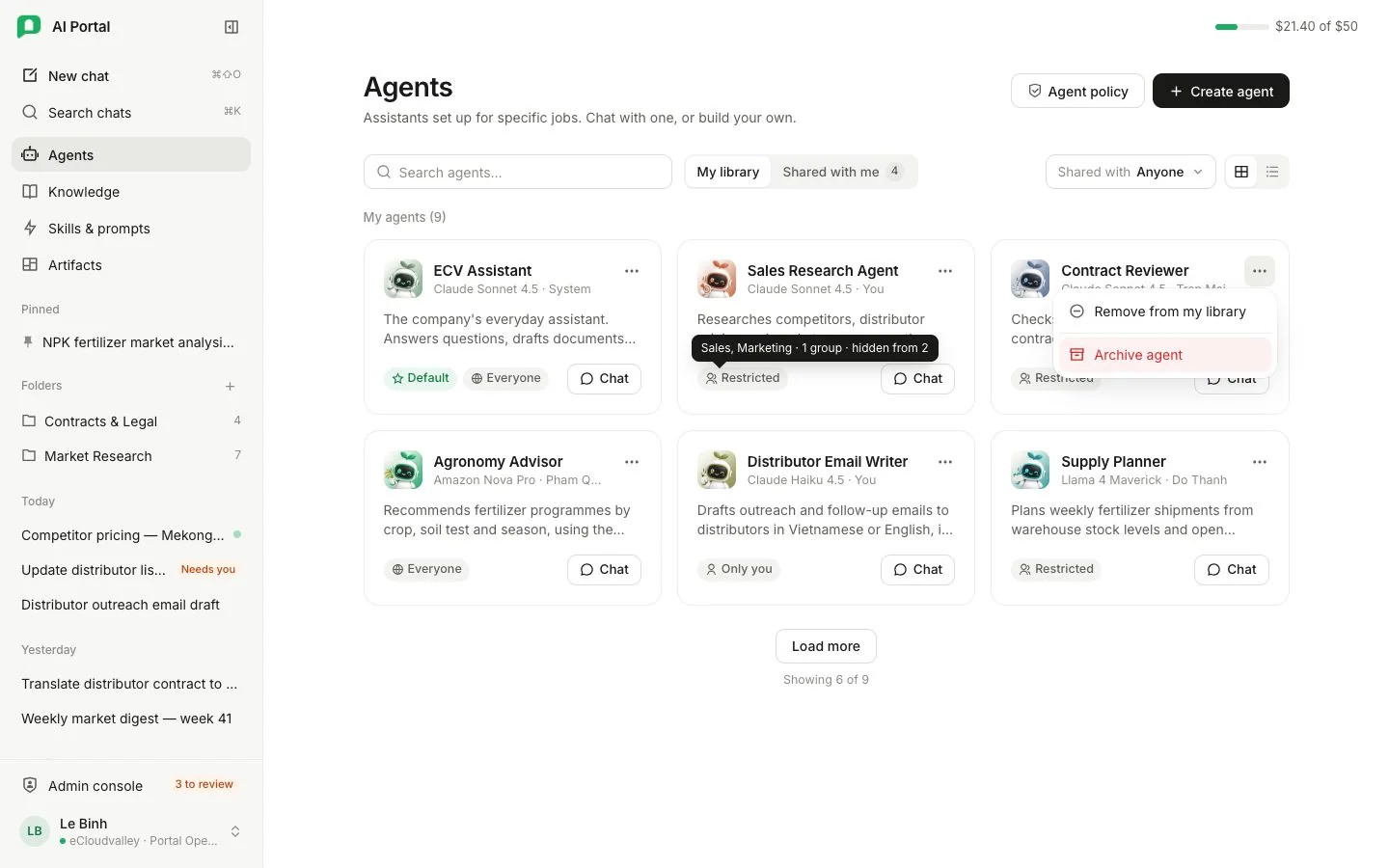
- 1 Agent policy — administrators only.
- 2 Create agent — builds one you own.
- 3 My library and Shared with me.
- 4 Shared with — narrows either list.
- 5 Default — the agent a new chat opens with.
- 6 Who reaches it — hover Restricted for the names.
- 7 Chat — starts a conversation with it.
- 8 More — remove from your library, or archive.
- Create agent builds one you own; every new agent starts private and you share it from its page. Administrators can always create agents; members can when the organisation lets them, and otherwise the button is not shown. See Building an agent.
- Pressing an agent opens its page: a summary of what it does unless you may change it, with Chat with this agent at the top. Chat on the card starts a conversation instead. A link to an agent you cannot use says so.
- Above the list, My library and Shared with me (N) switch between the agents you own or added and those shared with you that you have not added yet; Add to library puts one on your shelf. The search box and the Shared with filter narrow either list.
| Chip | Who reaches the agent |
|---|---|
| Everyone | Everyone in the organisation |
| Restricted | Named departments, groups or people |
| Only you | Nobody else |
Each card names the agent’s model and its owner, and the organisation’s default agent carries Default. Its More menu removes it from your library (with Undo) or, for an agent you may change, Archive agent. The default agent cannot be archived until another agent is made the default.
How sharing works across agents, skills, prompts and knowledge bases: Sharing and your library.
For administrators: agent policy
Administrators manage the agent policy in Admin console › Organisation › Agents; Agent policy at the top of the agents page opens it.
| Setting | What it does |
|---|---|
| Default agent | The agent a new chat opens with. It must be shared with everyone. Make default agent is also in an agent page’s More menu. |
| When someone starts a chat | Let people choose, Ask them to choose first or Always use the default, which needs a default agent first. |
| Show agents in the workspace | Whether the agent library shows in the rail. |
| Let members create agents | Whether members see Create agent. |
Changes that take something away from everyone ask first. Full reference: Organisation.