

Admin console overview
Where your organisation runs the portal: people, models, budgets and the rules around them.
The Admin console is where your organisation runs the portal. Each screen opens with one capability, so what you see depends on your role.
Open the console
Select Admin console at the bottom of the sidebar. The chip beside it counts requests waiting for you. The console is a mode of the same app: Back to workspace returns you to where you were, and ⌘K jumps to a person, group or screen.
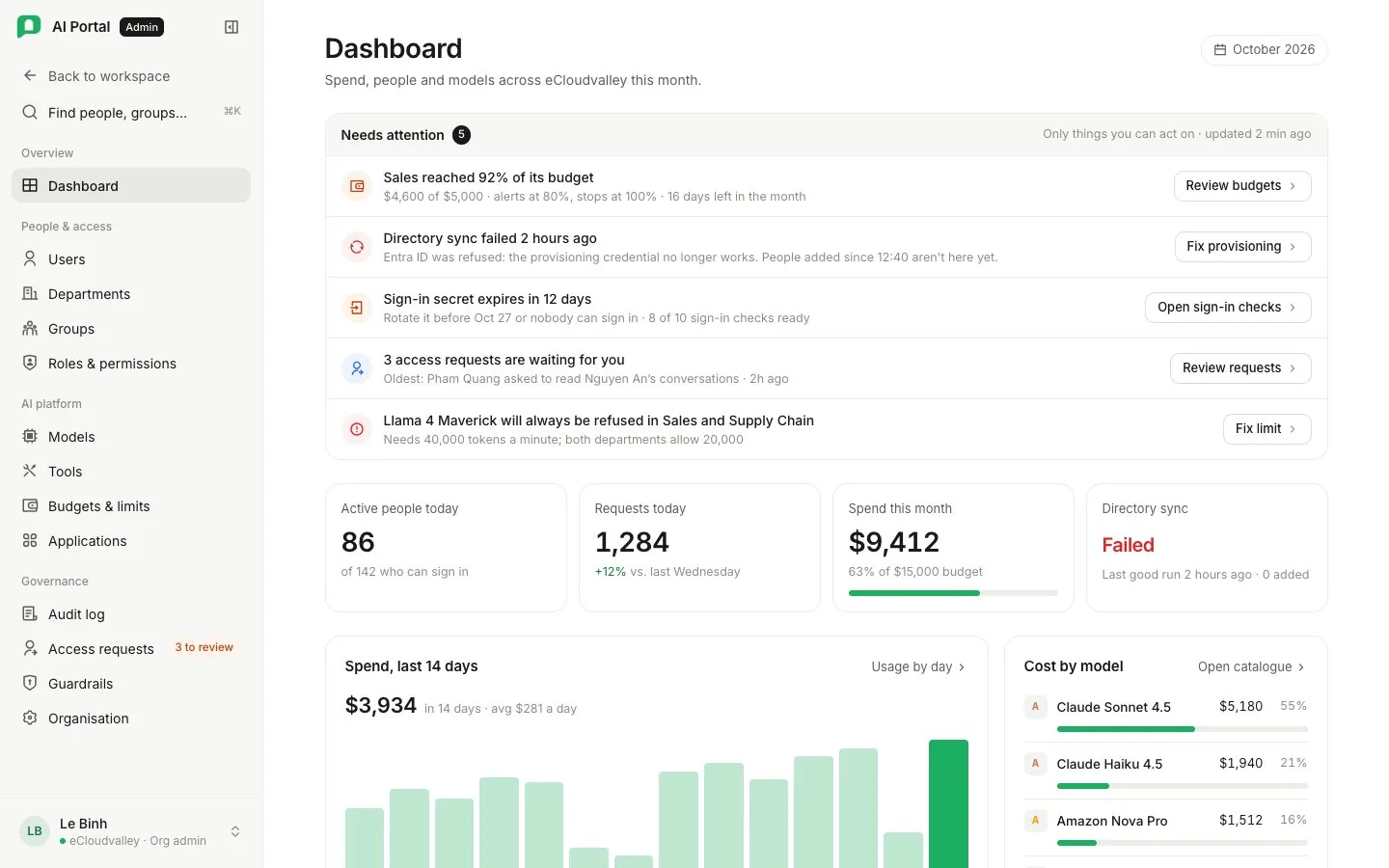
The console lands on the first screen your role may open.
What’s in the console
Thirteen screens in four sections. Each card names the capability that opens it. Org Owner and Org Admin open every screen.
Overview
People & access
user.manage. Departments Cost buckets: who is in each, which models they may use, their budget. Opens with department.manage. Groups Bundle roles and appear in visibility rules. A group never holds budget. Opens with group.manage. Roles & permissions The only source of capability. Opens with role.manage. AI platform
model_catalog.manage, or with byok.manage as Provider keys (Department Lead). Tools Web search, SharePoint and custom tools agents can call. Opens with tool.manage. Budgets & limits Monthly budgets, token quotas, rate limits and alert thresholds. Opens with policy.manage. Applications Connected apps (MCP servers) and whether each call asks first. Opens with application.manage. Governance
audit.view (Compliance Reviewer). Access requests Ask for, or decide, access to conversations and higher budgets. Opens with transcript.read, transcript.approve or policy.manage. Guardrails Check messages, tool results, documents and answers against your rules. Opens with org.settings.manage. Organisation Profile, branding, sign-in and provisioning, agent policies and approvals. Opens with org.settings.manage. SharePoint is set up on the Tools screen; see SharePoint setup.
A custom role holding one capability opens one screen. A cost analyst sees spend only and a compliance reviewer the audit log only; both are ordinary members of a department in every other respect. Access requests opens for anybody who may ask for or decide a request.
What the console never does
Key rules
- A department never grants permissions. Departments carry budget and policy. Permissions come only from roles, given to people directly or bundled in groups.
- It never shows a person’s memory. Usage appears in totals only.
- It never opens a conversation silently. Reading one needs
transcript.readand, where your organisation requires it, a request a second admin approved. Every read is recorded. - Every change is on the record. The audit log’s Configuration changes tab lists who changed a budget, a role, a department or a credential, and when. Nothing in the console edits or removes an audit row.
Start with the dashboard
Read Budget by department first. A department crossing its soft alert is named there, once per month per threshold, with Review budgets beside it.
| Tile or card | Shows |
|---|---|
| Active users | People active today and this week, and how many accounts are enabled |
| Requests today | Today’s requests, with this week’s beside them |
| Spend this month | The organisation’s spend against the sum of its department budgets |
| Directory sync | The last provisioning run: running, healthy with the count provisioned, or failed with its reason. Absent until a first run |
| Budget by department | Each department’s spend against its budget and hard stop. Manage budgets opens Budgets & limits |
| Spend trend | Daily spend across the organisation over the last 14 days |
| Cost by model | This month’s spend per model. Open catalog opens Models |
| Recent model calls | The six newest audit entries, each marked allowed, blocked by budget or blocked by a guardrail |