

Guardrails
Turn on the organisation's guardrail policy and choose what each rule does, and where.
Your organisation has one guardrail policy. It checks text where it first enters a conversation: a person’s message, a tool result from outside the portal, a document section at ingest, and the answer as it streams. The screen needs org.settings.manage. How each checkpoint behaves is in Guardrails.
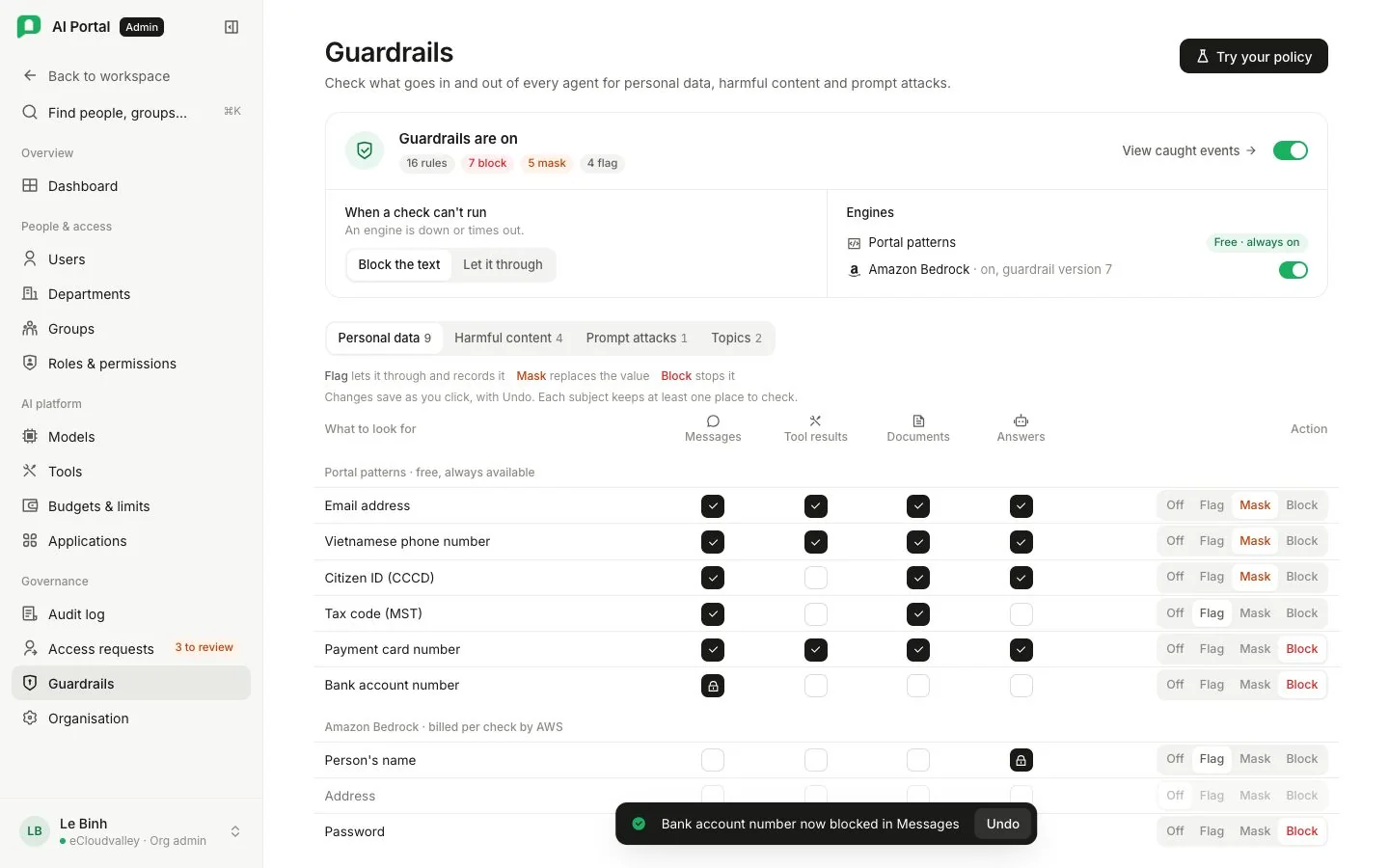
-
Switch guardrails on
The On/Off switch on the policy card turns the whole policy on or off. Turning it off asks first, since nothing is checked for anybody while off. Rules are kept and still save. The card counts rules by action; View caught events opens the audit log’s Guardrails tab.
-
When a check cannot run
Applies after one retry. Block the text refuses it and is the default. Let it through passes it and records the failure; choosing it asks first.
-
Choose a rule group
Personal data, Harmful content, Prompt attacks and Topics, one at a time. A legend says what Flag, Mask and Block do. Under Topics, Add topic asks for a name (up to 100 characters), a definition (up to 200) and up to five example phrases, one per line. Edit reopens it; Delete asks first.
-
Choose an action
Each subject has Off, Flag, Mask and Block. Flag records a finding and lets the text through. Mask replaces the value with its subject in brackets, such as
[EMAIL], before the model sees it (personal data only). Block refuses the text. When several rules match, block beats mask and mask beats flag. -
Choose the checkpoints
A new rule is checked at Messages, Tool results, Documents and Answers, except a prompt attack, which starts on tool results and documents only. A subject with no rule shows them greyed out. Click a checkpoint to add or remove it; one always stays.
Try your policy
Try your policy runs the saved rules on sample text without sending it to a model or recording it. Samples cover personal data, a prompt attack and harmful content. If nothing matches because no rule runs at the chosen checkpoint, it says so; if an engine could not run, it names the engine even when your policy lets the text through.
Subjects
| Rule group | Subjects |
|---|---|
| Personal data | Email address, Vietnamese phone number, citizen ID (CCCD), tax code (MST), payment card number and bank account number, found by the built-in pattern engine at no cost; name, address, age, password, username, IP address, web address, card number, IBAN and SWIFT code, found by Bedrock |
| Harmful content | Bedrock’s content categories |
| Prompt attacks | Instructions planted in what the agent reads |
| Topics | Subjects your assistants should not discuss, each with a definition and up to five examples |
Engines
Portal patterns run whenever guardrails are on. Every other subject is checked by Amazon Bedrock, which adds about 0.7 seconds per check and is billed per 1,000 characters to the department the check ran for. Bedrock has its own switch, which asks before turning on because it starts billing.
- With Bedrock off nothing is billed; a rule on a Bedrock subject is kept and marked Not checked while Amazon Bedrock is off, and a group only Bedrock checks offers Turn on Bedrock.
- Switching a subject on or adding a topic publishes a new version of your Bedrock guardrail, which takes a few seconds. The card shows the version in use; a failed publish shows Sync failed with the reason and Retry.
Documents already indexed
A document keeps the result it was indexed with. A rule added later does not reach it until it is reprocessed: open it in Knowledge and choose Reprocess.
What gets recorded
Every match writes a row naming the person, the checkpoint, the rule and the action, without the matched text, on the audit log’s Guardrails tab.