

SharePoint setup
Add SharePoint to the sign-in application, grant the sites it may read, and store the credential in the portal.
SharePoint uses the Entra application people sign in through, with the same secret, and reads as the organisation itself. A scheduled sync uses it to pull a folder into a knowledge base while nobody is present. Nothing else reads SharePoint: an agent answers from the knowledge base, never from the site, and nothing the portal does writes to SharePoint.
Setup takes one more permission on that application, a site grant from the Microsoft 365 admin, and the credential in the portal. The first-run wizard can store the credential at its Documents step; sites are always added here, because the portal can only check a grant, never make one.
Who does which step
| Step | Who |
|---|---|
Add Sites.Selected to the sign-in application | Anybody who may edit that app registration |
Admin consent for Sites.Selected | Global Administrator or Privileged Role Administrator |
Consent Sites.FullControl.All for Graph Explorer | Global Administrator, Privileged Role Administrator, Cloud Application Administrator, Application Administrator or AI Administrator |
| Grant a site to the application | SharePoint Administrator or higher who is also a member of the target site |
| Credential and sites in the portal | An Org Admin, or anybody holding tool.manage |
| Pick a site and folder for a knowledge base | Anybody with the knowledge permission (the Knowledge Curator role) |
1. The Entra application
-
Open the sign-in application
Microsoft Entra ID › App registrations › the application registered for sign-in. -
Add the permission and consent
API permissions › Microsoft Graph › Application permissions ›
Sites.Selected, then Grant admin consent. The button is greyed out without one of the two consent roles. SharePoint needs no other Graph permission.If whoever built the registration holds neither role, the portal’s Setup guide offers Copy consent link once the credential is saved, to send to somebody who does.
-
Copy the two IDs
The Overview page carries the Directory (tenant) ID and the Application (client) ID. -
Reuse the sign-in secret
The client secret entered on the Sign-in provider card works here too. When you rotate it, enter the new one in both places.
2. The credential and the sites in the portal
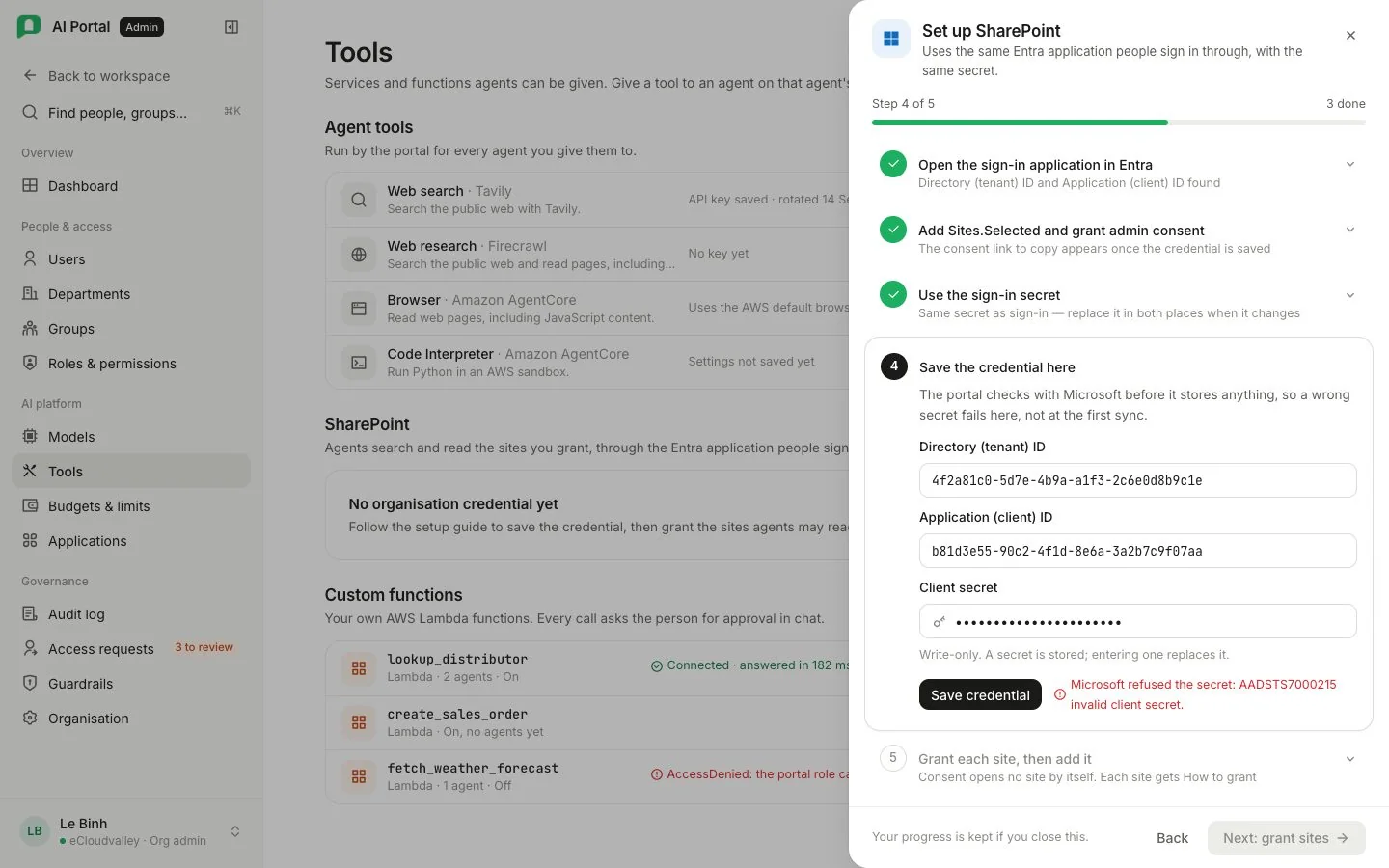
An organisation that has never used SharePoint has no row for it. Select Set up SharePoint; the Organisation credential and Granted sites cards appear. Setup guide in the header opens these steps and stays open until a credential is stored. The switch beside it turns SharePoint on and off.
-
Organisation credential
Fill in Directory (tenant) ID, Application (client) ID and Client secret, then Save credential. The portal asks Microsoft for a token before storing anything, so a wrong secret fails here, not at the first sync. One application per organisation holds the credential. The secret goes into the deployment’s secret store and is never served back, so the field is empty each time.
-
Granted sites
Paste a site URL, such as
https://<company>.sharepoint.com/sites/<site>, and select Add site. Readable means the application reached it. Not readable usually means the site grant is missing. No answer means Microsoft did not reply. Check again asks once more; Remove takes it off the list.
3. Grant each site
Sites.Selected opens no site by itself. The Microsoft 365 admin names each site the application may read, which bounds every knowledge base fed from SharePoint. The site must be in the tenant the application is registered in.
The grant is a POST to /sites/{site-id}/permissions carrying read and the application ID. It needs delegated Sites.FullControl.All (the only permission Microsoft offers for that call), the SharePoint Administrator role or higher, and membership of the target site. The portal cannot make it with its own credential.
Until a site reads back readable, its row offers How to grant, already filled in with the site address and application ID. In Graph Explorer:
-
Sign in
As a SharePoint Administrator or higher who is a member of the target site. Add the account to the site first if needed. -
Consent
Under Modify permissions, consentSites.FullControl.Allfor Graph Explorer, then refresh or sign in again so the token carries it. -
Look the site up
Run theGETthe row shows and paste theidfrom the response back into the row. -
Grant
Run thePOSTthe row then shows, with its request body. Graph answers201 Created. -
Check again
Select Check again on the row. It turns Readable.
PnP PowerShell can make the same grant, but its sign-in now needs an Entra application of its own, so the portal does not offer it. Read access is enough. To stop the portal reading a site, Remove it in the portal and delete the permission in SharePoint.
Switching SharePoint off
The switch stops every sync at its next run and takes the site list out of the folder picker. The portal asks first, because the whole organisation stops.
SharePoint folders in knowledge bases
The organisation’s Document search job must name an embedding model on Models; without it an ingest finishes with no passages. Curators add folders with Add SharePoint folder; see SharePoint folders. Everything a sync ingests is billed to the department of whoever created the source.
What goes wrong
| What you see | What it means |
|---|---|
| Not readable on a site | The site grant is missing, the tenant has not consented Sites.Selected, or the site is not in the application’s tenant |
| No answer on a site | Microsoft answered with another error or did not answer |
| “No Entra application configured” when picking a folder | The organisation credential has not been saved |
| “Switched off for this organisation” on a source | SharePoint is off; the next run stops before reading or billing anything |
| “Not readable by this tool’s application” when creating a source | The site was readable when added and is not now |
| Documents indexed, no passages | Document search names no embedding model |
| A source that stopped | Its payer lost their seat, someone pressed Pause, or the department’s budget refused an ingest. The card names which, beside the fix |