

Applications
Which connected apps (MCP servers) the organisation permits, how each authenticates, and whether each call asks first.
An application is an MCP server that agents call as a governed tool, through the same gateway every model call goes through. Who reaches it is set by the sharing rules on the application: a turn is offered the tools of the applications that person can see. People see these as Connected apps.
Something the organisation runs under its own credential is a tool.
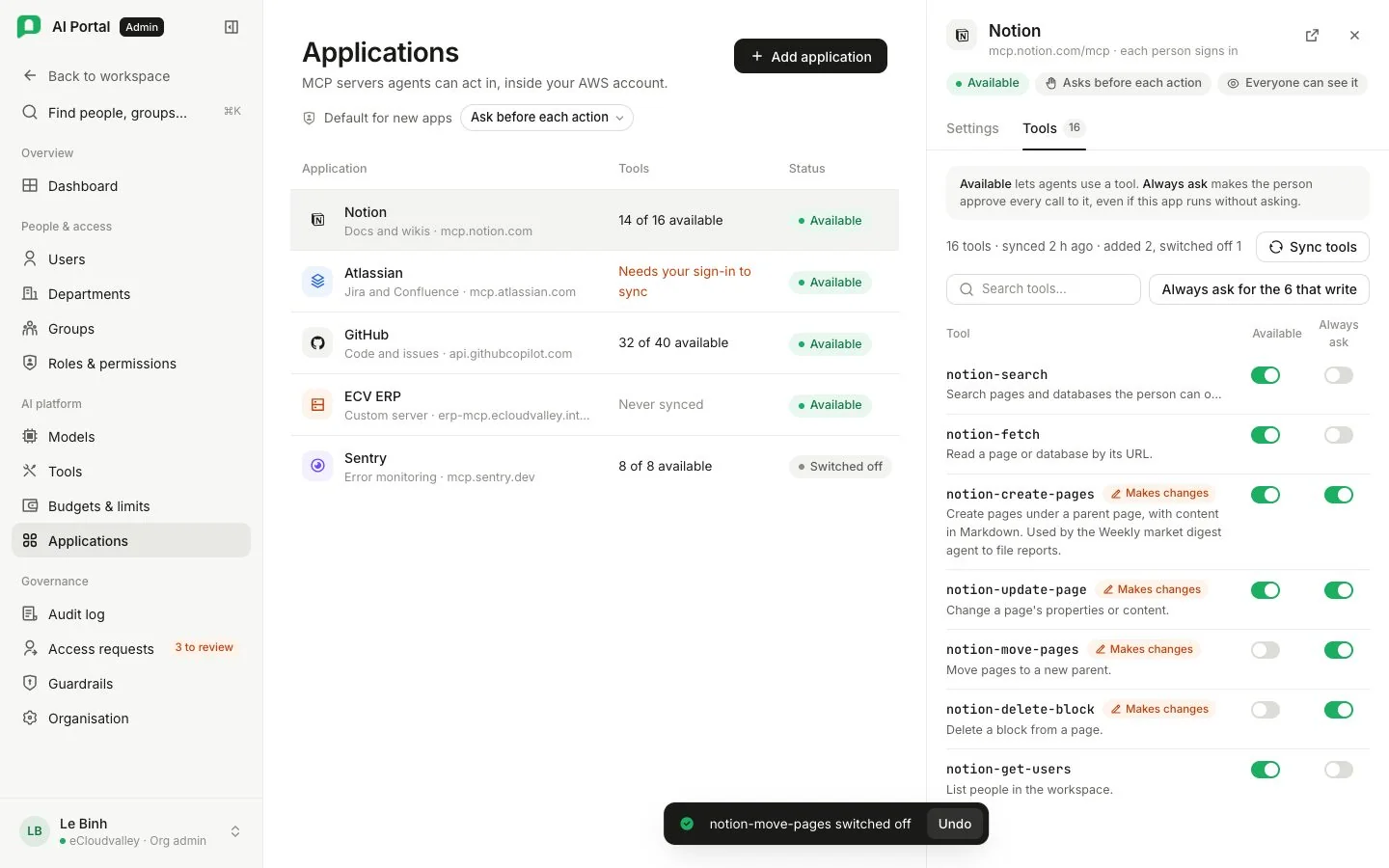
Two tiles count the applications and how many are switched off. Each card shows the server’s address, Available or switched off, and its Scope, such as the whole organisation with any deny rules.
| Button | Does |
|---|---|
| Add application | Picks a server the portal knows, or takes an address, and says who reaches it |
| Configure | Opens a registered application: name, server, who reaches it, and whether the organisation permits it |
Register an application
The portal knows how to reach Notion, GitHub, GitLab, Linear, Atlassian, Asana, Sentry, Stripe and PayPal. Picking one fills in its address, transport and authentication; the address stays editable.
A server not on the list, such as one inside your own AWS account, is registered by typing its address. A typed address starts on streamable HTTP; the drawer can switch to the older transport for a server that speaks only that.
SharePoint is not on the list: it is a tool the organisation runs, set up on SharePoint setup.
Who reaches an application is asked when it is created and changed in the drawer afterwards.
Authentication
| Kind | Who holds the credential | The form asks for |
|---|---|---|
| None | Nobody. The server is reachable only inside the VPC | The address |
| One key for the organisation | The organisation, as a secret reference | The address and the reference |
| Each person signs in | Each person, through their own consent | The address, plus a client ID and secret when the provider has no dynamic registration |
| The caller’s own token, exchanged | Nobody. The gateway exchanges the caller’s token for one scoped to that server | The address and an audience |
A listed server carries its kind, which the screen states rather than asks. A provider with dynamic registration needs nothing more. Others need an admin to register an OAuth app and enter its client ID and secret. These identify the portal; each person still grants access with their own account.
GitHub
GitHub’s MCP server does not support dynamic client registration, so the GitHub entry asks for an OAuth App.
-
Create a GitHub OAuth App
-
Set the callback
Authorization callback URL = your portal’s address followed by/api/mcp/callback. -
Enter the credentials
Enter the app’s Client ID and Client secret when adding GitHub. For an existing application, open Configure → OAuth App, enter them and save. A blank secret keeps the saved value. -
Connect
Select Connect and approve access with your GitHub account.
Use the Client ID exactly as GitHub shows it; any other value is answered with a 404.
Permitting and connecting
Registering an application permits it for the organisation. Connecting is each person’s own consent in Settings › Connected apps, and only the “each person signs in” kind asks for it; under the other three kinds an agent reaches the server without anybody connecting.
Switching an application off refuses it for the whole organisation, existing connections included. Anybody can withdraw their own connection at any time.
The application’s tools
An application’s tools are rows of their own, owned by the organisation rather than one person’s connection. Each carries whether it writes, whether it is switched on, and whether it stops for a confirmation before every call. An agent binds a tool, so the binding survives the person who registered the application disconnecting.
- A tool that writes asks first (Ask before each action) until an admin lowers it.
- Run without asking (YOLO) skips that confirmation only. Permissions, OAuth scope, policy, idempotency and the audit trail still apply.
- Tools are read from the server itself, through the gateway. Syncing again adopts what the server offers now; a tool it stopped offering is switched off, not deleted, because agents may still be bound to it.
- A server that signs each person in answers as whoever asks, so an admin who has not connected reads an empty list; the drawer offers the sign-in where the sync button is.
The organisation-wide default for whether connected apps ask before each action is on Organisation › Agent policies.