

Audit log
What the audit log records about model calls, conversations, configuration changes and guardrail findings, and how to export it.
Key rules
- One row is one model call. A turn of six calls is six rows; the cost column adds them up.
- No message content. Model calls and configuration changes never hold what was said. Conversations is the only way in, and every read is recorded.
- Nothing is edited or removed. The log is immutable, including the rows that reads write.
| Capability | Opens |
|---|---|
audit.view | The log |
audit.export | CSV export |
transcript.read | The Conversations tab (Compliance Reviewer holds it) |
transcript.approve | Approving reads of conversations |
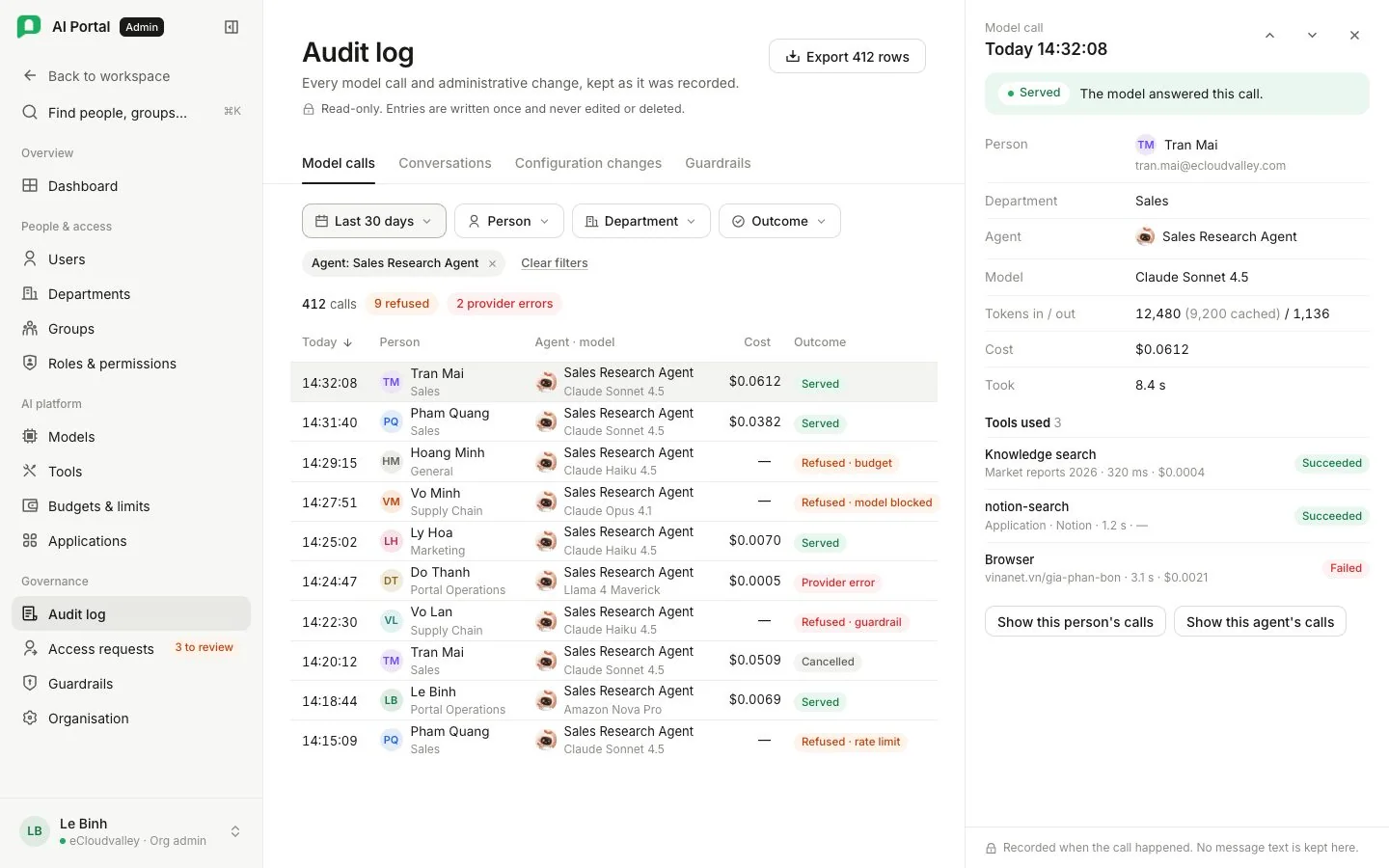
The log has four tabs: Model calls, Conversations, Configuration changes and Guardrails.
Model calls
Above the rows, counts show calls in view, allowed and blocked.
| Column | Meaning |
|---|---|
| Time | When the call was made |
| Person | Who made it, and their department, which is where the cost lands |
| Agent | The agent, or the portal’s own background job when no agent was involved |
| Model | The model that answered |
| Tokens in / out, Cost | What the gateway recorded. A dash for cost when the call was refused |
| Tools | What the call reached for |
| Outcome | Served or refused; a refused row says why |
A document ingest appears as rows naming no agent, so a knowledge upload stays traceable to the department that paid for it.
The detail panel shows a status banner, the department billed, tokens in (with the cached part in brackets) and out, how long the call took, and each tool used with where it ran, how long, its cost and whether it succeeded. Show this person’s calls filters to the same person or agent.
Outcome values
| Outcome | Means |
|---|---|
| Served | The model answered |
| Refused · budget | The person’s share or the department’s budget was used up |
| Refused · quota | A token quota was reached |
| Refused · rate limit | Too many requests or tokens in a minute |
| Refused · model blocked | The person’s department switched this model off |
| Refused · guardrail | A guardrail rule blocked the request |
| Provider error | The model provider failed to answer |
| Cancelled | The reply was stopped before it finished |
Filters
| Filter | Options |
|---|---|
| Date range | Today, 7 days, 30 days (default), All, or Custom with start and end |
| Person, department, agent | Everyone / Any department / any agent, or one of each |
| Outcome | Any outcome, Served, Provider error, Cancelled, or Refused for any reason or one |
Filters live in the page address, so a copied link opens the same list. More rows load with Show more.
Export
Export N rows downloads the model calls the filters select as CSV, with each person’s name and email and each department’s name. Needs audit.export.
Conversations
Each row is one conversation: title, owner, agent, message count, cost, thumbs up and down, when it started and last moved, and Access. Filters: Everyone or one person, Any department or one, 7 days, 30 days or All, and Current or Include deleted (a deleted conversation survives until the deletion job runs). Search matches titles only.
Opening a row records who read it, whose it was and when; the panel says so before the first line appears. Where your organisation requires approval, a row opens only under a grant a second admin approved; Access shows which rows are open to you, Awaiting approval, or need a request. See Access requests.
The thread is drawn as the person saw it: same questions, replies and one-line tool summaries, which open for detail. A line between exchanges shows the clock time, the model and what that answer cost. A failed, timed-out or stopped reply says so. Raw reasoning is never shown, only the thinking summaries the person saw.
The side panel lists the files the conversation produced, with size and version. Files open in a sandbox, and each read is recorded under the reviewer’s name. Only that conversation’s files are reachable.
Configuration changes
Who changed a budget, a role, a department or a credential, and when. When an admin acted while viewing as someone, the admin is named as the actor and the person as the target.
Guardrails
One row per finding, newest first: when, the person and department, Where the text entered (message, tool result, document, answer), what was Caught (rule kind and subject), the action (flag, mask or block) and the engine. A check that could not run reads Check could not run. The matched text is never stored.
See Audit and cost.