

Tools
Web search, web research, browser, code interpreter, SharePoint and Lambda functions your organisation runs for its agents.
A tool is something the organisation runs. An admin switches it on once, and an agent that lists it may call it under the organisation’s own credential, not anybody’s account. A system each person connects to under their own account is an application.
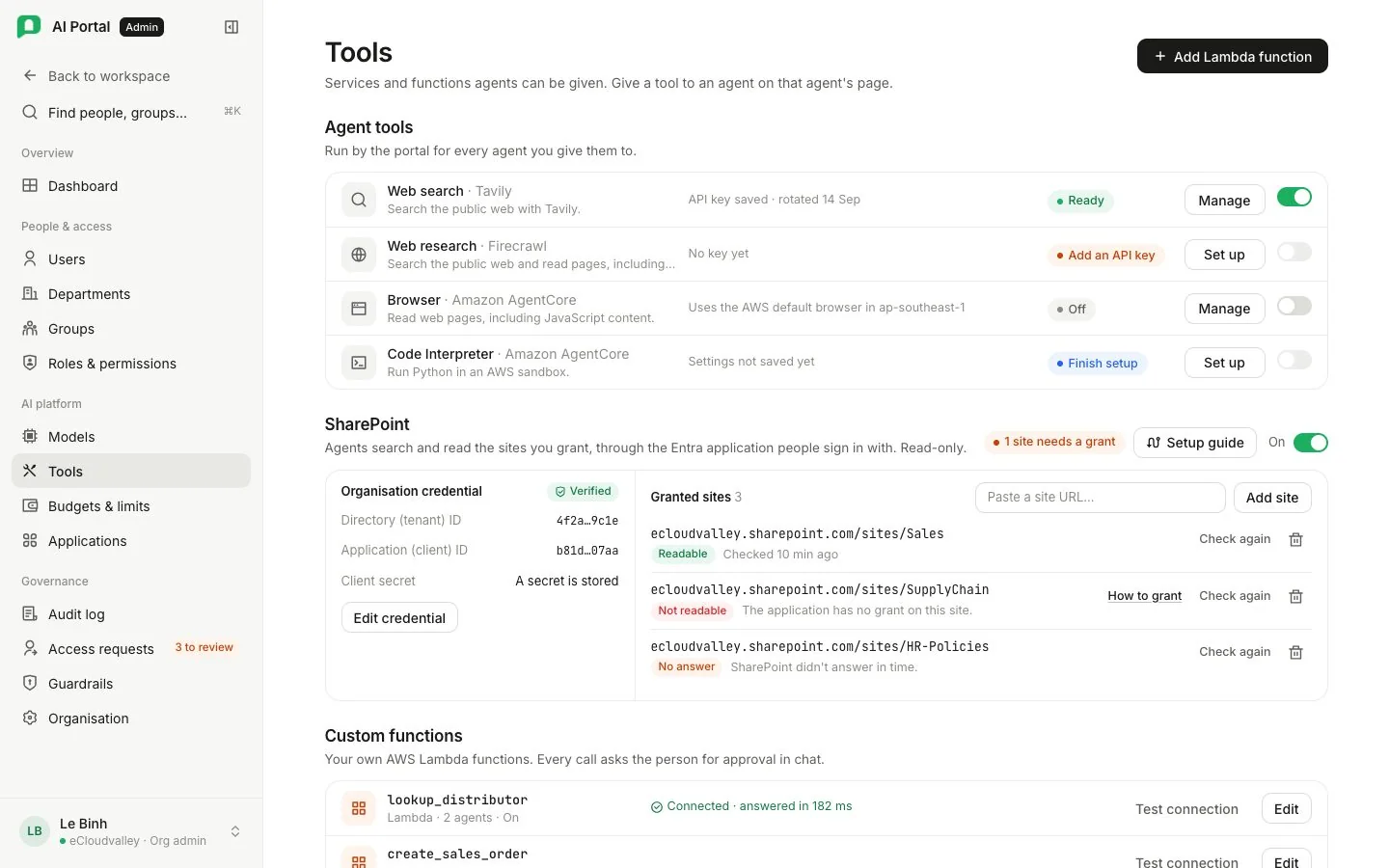
The screen has three sections: Agent tools, SharePoint and Custom tools. Each card reads Not configured until set up.
Agent tools
| Card | Access | Configure |
|---|---|---|
| Web search (Tavily) | Tavily API key | Save the key, then enable web search. The key is linked automatically |
| Web research (Firecrawl) | Firecrawl API key | Save the key, then enable. Renders JavaScript, reads PDFs including scanned ones, and replaces the static reader and the browser. Search from is an optional two-letter country; blank is the United States, VN ranks Vietnamese sources first |
| Browser (Amazon AgentCore) | Backend AWS identity (IAM) | Fill in the Resource ARN. No API key |
| Code Interpreter (Amazon AgentCore) | Backend AWS identity (IAM) | Fill in the Resource ARN. No API key |
With both Firecrawl and Tavily enabled, agents search through Firecrawl; turning Firecrawl off moves searching to Tavily and page reading to the browser. With neither, agents have no web search.
| Control | Does |
|---|---|
| Add API key | Stores a value securely in the deployment. Saved values are never displayed; updating a key keeps the service on it |
| Use an existing secret reference | Points at a secret already in AWS Secrets Manager, by full ARN |
| Use AWS default | Fills in the managed resource for your region. The backend’s AWS identity must have access to it; a Bedrock API key does not provide this |
| Enable for agents, then Save settings | Makes the service available to agents with the matching tool enabled. Enabled describes the saved setting, not a tested connection. Disabling keeps the settings |
SharePoint
SharePoint holds your organisation’s Entra application and the sites a Microsoft 365 admin granted it. Knowledge curators pick folders only inside those sites. Nobody connects a personal account. Set up SharePoint registers it, switched off; then store the credential and add sites. Everything is in SharePoint setup.
Custom tools
Add Lambda function exposes a function in your own AWS account to agents. Its row holds the function name, the ARN and the input schema an agent sees.
Test a tool
| Test connection on | Does |
|---|---|
| A service with an API key | Reads the stored secret and makes one authenticated call to the service’s usage endpoint, spending no credit. A refused key and an unreachable service give different messages |
| Browser or Code Interpreter | Opens and closes a session at the saved ARN with the backend’s AWS identity. Appears once settings are saved. Denied permission, missing resource and unreachable service give three different messages |
| A custom tool | Asks AWS Lambda to dry-run the function, checking the invoke permission and ARN without running it |
The screen opens with tool.manage. Managing an API key also needs model_catalog.manage; a card that uses a key says so when you hold only tool.manage.