

Roles & permissions
Roles are the only source of capability. Create custom roles and see what a person can actually do.
Org admins How-to 4 min read
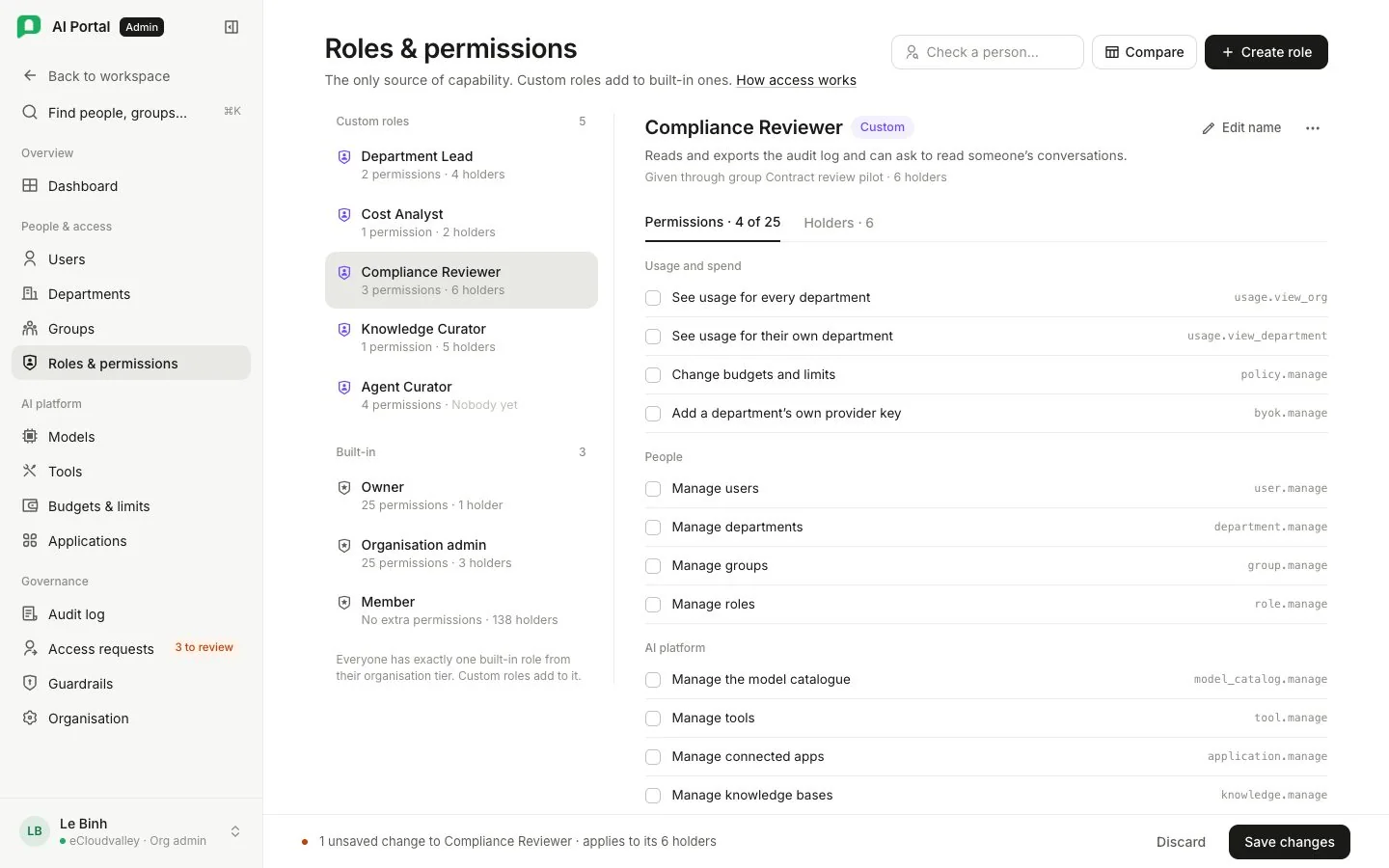
Everybody holds one built-in role from their organisation tier. A custom role bundles permissions and can be assigned directly to a person or added to a group as a reusable set. Your organisation starts with five custom roles: Department Lead, Cost Analyst, Compliance Reviewer, Knowledge Curator and Agent Curator.
| Tab | Shows |
|---|---|
| Roles | Built-in and custom roles as cards, each with its capability count, what grants it, and Holders |
| Permission matrix | Every capability against every role. Custom role columns can be edited here and saved together |
| Effective permissions | What one named person ends up able to do, and which role each capability came from |
Who holds what
| Capability | Org Owner built-in | Org Admin built-in | Org User built-in | Department Lead custom | Cost Analyst custom | Compliance Reviewer custom | Knowledge Curator custom | Agent Curator custom | In a custom role? grant ceiling |
|---|---|---|---|---|---|---|---|---|---|
| Organisation | |||||||||
Change organisation settings org.settings.manage | — | Built-in only | |||||||
Manage billing billing.manage | Owner only | — | Built-in only | ||||||
| People | |||||||||
Manage people user.manage | — | — | — | — | — | — | Yes | ||
View the portal as someone else user.impersonate | — | Built-in only | |||||||
Approve a request to view as someone impersonation.approve | — | Built-in only | |||||||
Manage departments department.manage | — | — | — | — | — | — | Yes | ||
Manage groups group.manage | — | — | — | — | — | — | Yes | ||
Manage roles role.manage | — | — | — | — | — | — | Yes | ||
| Models & spend | |||||||||
Manage the model catalogue and approve keys model_catalog.manage | — | — | — | — | — | — | Yes | ||
Add a department's own provider key byok.manage | — | — | — | — | — | Yes | |||
Set budgets and limits policy.manage | — | — | — | — | — | — | Yes | ||
See spend across the organisation usage.view_org | — | — | — | — | — | Yes | |||
See your own department's spend usage.view_department | — | — | — | — | — | Yes | |||
| Resources | |||||||||
Change sharing on any resource visibility.manage | — | — | — | — | — | — | Yes | ||
Manage agents agent.manage | — | — | — | — | — | Yes | |||
Publish an agent to everyone agent.publish_org | — | — | — | — | — | Yes | |||
Manage skills skill.manage | — | — | — | — | — | Yes | |||
Manage prompts prompt.manage | — | — | — | — | — | Yes | |||
Manage artifacts artifact.manage | — | — | — | — | — | — | Yes | ||
Manage knowledge bases knowledge.manage | — | — | — | — | — | Yes | |||
| Apps & tools | |||||||||
Manage tools tool.manage | — | — | — | — | — | — | Yes | ||
Manage connected apps application.manage | — | — | — | — | — | — | Yes | ||
| Oversight | |||||||||
Read the audit log audit.view | — | — | — | — | — | Yes | |||
Export the audit log audit.export | — | — | — | — | — | Yes | |||
Read conversations as evidence transcript.read | — | — | — | — | — | Yes | |||
Approve a request to read conversations transcript.approve | — | — | — | — | — | — | Yes | ||
| No capability matches this filter. | |||||||||
Create a custom role
-
Create custom role
At the end of the custom roles, enter a Name, an optional Purpose, and a role to Start from, whose capabilities are copied in. -
Tick capabilities
The new role opens in its drawer. Save writes the ticked capabilities. Edit permissions on the card reopens the drawer later. A built-in role offers View permissions instead, read-only. -
Give it to people
Add it under Custom roles on a person’s profile, or to a group’s Role bundle. A role nobody holds and no group bundles grants nothing.
Some capabilities can never go into a custom role: user.impersonate (View as) belongs to Org Owner and Org Admin only, and billing.manage is never delegable.