Resource visibility
Every agent, skill, prompt, knowledge base, connected app and artifact carries its own sharing rules. Here is exactly how the portal decides whether one person can see one resource.
Every resourceResourceTài nguyênAnything shared in the portal: agents, skills, prompts, knowledge bases, connected apps and artifacts. Resources belong to the organisation, never to a department.Open in glossary — agents, skills, connected apps, prompt templates, artifacts and knowledge bases — carries its own sharing rules. VisibilityVisibilityQuyền xemA resource's own sharing rules: who can find and use it, by department, group or person. Seeing a resource never grants extra permissions.Open in glossary answers which things may this person act on. It runs on every single open and every listing, and it grants no capability, model or budget.
Key rules
- Deny is checked first and always wins, even over the owner.
- A rule names a department, a group or one person.
- Visibility never grants a capability, a model or a budget — only the right to see and use.
- Hidden looks exactly like missing. Nobody learns that a resource exists.
- A knowledge base decides for everything inside it.
Try it: the visibility playground
Pick a person, switch rules on and off, and watch the check run. It uses the same order the portal uses on every list and every open.
- 1. Is the person's account active?Suspended or removed accounts see nothing. Yes
- 2. Does the resource exist?Deleted resources answer nothing. Yes
- 3. Does any deny rule match?Matches if it names the person, their department or a group. Contractors
- 4. Is it shared with everyone?The organisation-wide switch. Not reached
- 5. Does the person own it?Owners see their own resources. Not reached
- 6. Does any allow rule match?Same matching as deny. Not reached
Rule shape
Every resource carries its own rules. None is owned by a department, so nothing is inherited.
orgWide: true | false
allow:   departments, groups, users
deny: departments, groups, users- Only the org-wide switch is stored. A closed resource with rules is what screens call Restricted; one without rules is Private.
- Each rule is an effect (allow or deny) plus exactly one of a department, a group or a person.
- “Matches” is the same test for deny and allow: the rule names this person, the department they are billed to, or one of their groups.
The rule order
The checks run top to bottom, and the first one that gives an answer ends it.
-
Account active
Someone suspended in the portal or disabled in your identity provider sees nothing, for any resource.
-
Resource exists in your organisation
A missing resource has nothing to show.
-
Any deny rule matches — stops here
One match hides the resource. The owner, an allow rule or “everyone” cannot undo it.
-
Shared with everyone
The org-wide switch makes it visible to everyone left.
-
Owner
The owner always sees it, unless a deny rule already said no.
-
Any allow rule matches
A match makes it visible. No match: hidden.
Deny always wins
Deny is evaluated before the org-wide switch, ownership and allow, and returns at once. A contractor inside the Sales department is still denied a Sales agent when a deny rule names their group: the department allow, the org-wide switch and ownership rescue nobody.
Beating ownership lets a compliance reviewer pull a resource without changing who owns it. It holds on the write path too, since editing also requires the resource to be visible.
A knowledge base and everything filed under it
A knowledge baseKnowledge baseKho tri thứcA collection of documents agents can search and cite. Files are uploaded or synced from SharePoint, and each knowledge base has its own sharing rules.Open in glossary (internally, a collection) is a resource like any other. Nothing filed under it has an answer of its own: a memory statement and a document excerpt are rows in one store, each naming its knowledge base, and reading or writing either takes the knowledge base’s answer.
The knowledge bases a search may read are resolved against the person before the query runs. A refused knowledge base answers nothing — even through an agent bound to it.
Your personal memories sit in a knowledge base you own, with no rules and no listing; you need no capability to write there. A statement that also names a conversation and an expiry is the same kind of row with a shorter life.
Access checks in plain language
Visibility combines with the person’s capabilities from Roles and capabilities:
| Action | Allowed when |
|---|---|
| Read | the resource is visible to you |
| Edit | it is visible and you own it or hold the type’s manage capability |
| Change its sharing | you own it and it is visible to you — or you hold the sharing capability |
- The sharing capability (
visibility.manage) skips the visibility test, because a private resource is invisible to everyone but its owner and that holder must govern more than what was shared with them. It still cannot reach another organisation’s resources. - The owner path keeps the visibility test, so a deny that hides a resource from its owner does not give the owner the power to remove it.
- Permission to edit content never counts as permission to change sharing.
Guarantees
| Guarantee | How |
|---|---|
| A person without access sees nothing, for any resource | checked before any resource or rule data is touched, for IdP-disabled and portal-suspended alike |
| Lists are filtered before paging, never after | page 3 is page 3 of what you can see |
| Not visible reports “not found”, never “forbidden” | every open returns the same error as a missing resource |
| Every list you see is filtered | the portal’s backend decides; an unfiltered screen would be the same hole |
Your library
Reaching a resource is governance: the sharer and the administrator decide, deny beats allow, a refusal is “not found”. Having it on your shelf is your preference and needs no capability.
| Rule | Detail |
|---|---|
| Pushed share | A share by someone holding the type’s manage capability (for anything except artifacts) lands straight in your library |
| Offered share | A share by a peer waits until you add it |
| Two shares disagree | The pushed one wins |
| Ownership | Your own resources are on your shelf, even if private |
| Artifacts | Always offered: you must press Add, even for org-wide or pushed artifacts. Your own work is still included |
| Removed | Your removal beats a later push. Nobody can re-insert into somebody else’s list |
| Storage | Only departures from the default are stored; sharing with a group of two hundred writes nothing |
| Knowledge bases | Not on the shelf — you reach them from the knowledge screen |
How to share and manage your shelf: Sharing and your library.
Sharing levels
The sharing sheet offers three levels. Only one switch is stored — open to everyone or not — and the rules you add make it restricted.
| Level | Who sees it | Notes |
|---|---|---|
| Everyone (org-wide) | the whole organisation, minus anyone a deny rule names | needs a publish capability, such as agent.publish_org |
| Restricted | only the departments, groups and people you add, minus deny | default when sharing |
| Only you (private) | the owner | new resources start here |
You set this from the resource’s Sharing section.
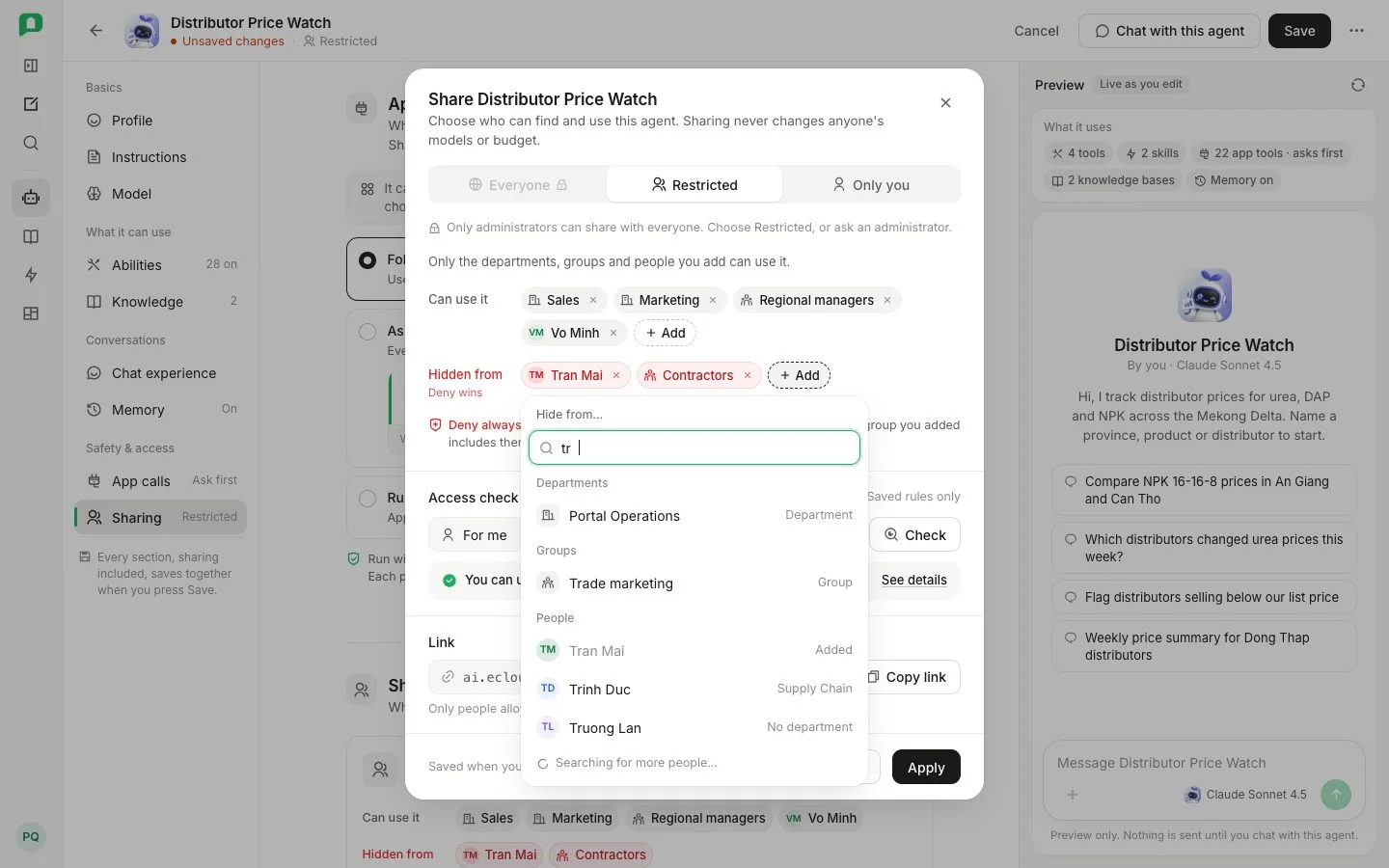
- 1 Sharing level — Everyone, Restricted or Only you
- 2 Who may pick Everyone
- 3 Can use it — allow rules
- 4 Hidden from — deny rules, which always win
Rules for the editor:
- The current sharing is read before anything is shown. Until it arrives there is no badge, the editor says it is still reading, and saving is refused — a save replaces the whole sharing state, so a guess would delete rules you were not shown.
- A rule kept across a save keeps its identity and creation time.
- Only you reaches the owner, so a resource with no owner cannot be made private; the choice is greyed out, and a save that would leave it unreachable is refused.
- Switching to Only you removes allow rules. Deny rules survive every level change; removing a deny still needs
visibility.manage. - Allow lists only apply to Restricted; they are discarded at the other levels.
Why it works this way
Why is a hidden resource 'not found' and not 'forbidden'?
“Forbidden” would confirm the resource exists. Answering “not found” for both missing and hidden means a list, a link or a guessed address never leaks what is there.
Why can a deny rule hide something from its owner?
Deny is checked before ownership, so a compliance reviewer can pull a resource without taking it away from the person who made it. The owner still owns it — but being hidden from it does not give them the power to remove the rule that hides it.
Why is a group deny the safest way to exclude contractors?
A contractor working with Sales is still billed to Sales, so a department allow lets them in. A deny on their group is checked first and beats that allow, the org-wide switch and ownership — and it follows membership, so whoever joins the group is excluded everywhere the rule appears.
Under the hood
AssertResourceAccess
AssertResourceAccess composes visibility with capabilities; HTTP guards and direct callers use it, and the two underlying resolvers stay unaware of each other.
read      = visible
write     = visible AND (owner OR capability)
authorise = (owner AND visible) OR capability
Routes declare content access with @RequireAccess(resource, "read" | "write"); the guard rejects missing, foreign or inaccessible targets before the use case loads content. A verified write satisfies read assertions in the same invocation. Sharing administration uses authorise separately, with the cross-org check repeated. Rule-row “exactly one target” is enforced in domain code.
Listing and authoring reads
Listings fetch candidates and their rules in two queries and paginate the resulting id set. The listing resolver is the only thing that consults library decisions; tests pin that the access path never does.
Sharing state is read from GET /visibility/resources?ids= (up to 200 ids per request), which returns only the resources whose sharing the caller may author — others are left out, not refused. A save that would leave a resource unreachable fails with resource_unreachable.