

Skills and prompts
How a skill differs from a prompt, the built-in skills every agent has, and creating your own skill.
Skill or prompt?
| SkillSkillSkillA reusable set of instructions an agent loads when a task calls for it, such as writing a report in your company's format.Open in glossary | PromptPromptPromptA saved message you reuse from the prompt library instead of typing it again.Open in glossary | |
|---|---|---|
| What it is | A way of working: its own instructions, and sometimes files | A message you insert yourself |
| Who picks it | The agent, when a request matches its trigger — or you, from / | Always you; the agent never chooses one |
| Blanks | — | Some have blanks to fill before they send |
| Tools or data | Never gives an agent a tool or data: turn on what it needs in the agent | — |
The Skills & prompts screen
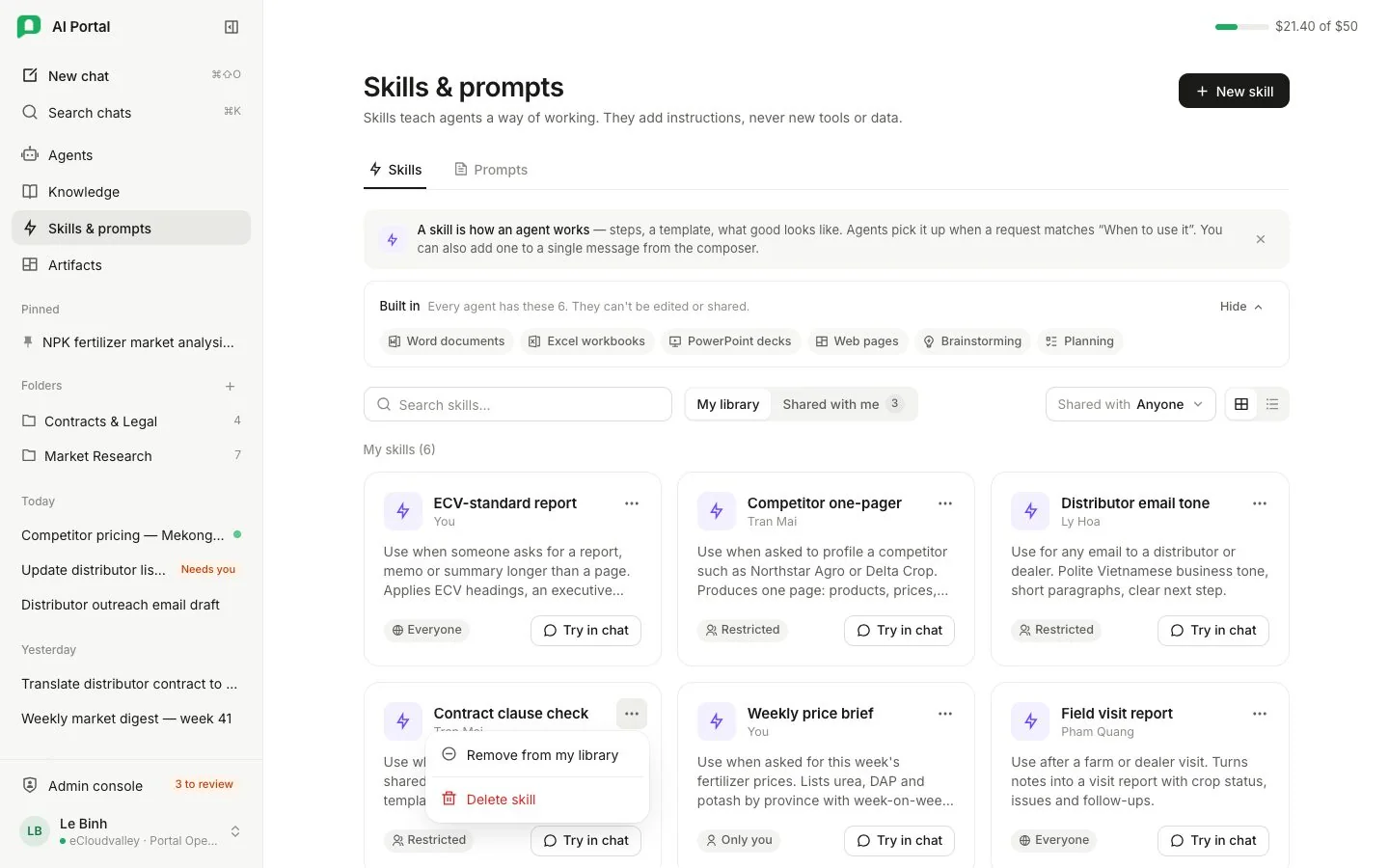
- 1 Skills tab.
- 2 Prompts tab — see the Prompt library.
- 3 Built in — every agent has these.
- 4 New skill — create your own.
- 5 My library and Shared with me.
- 6 Try in chat — stages the skill on your next message.
- 7 More — remove from your library, or delete a skill you own.
- A skill card shows its owner and description. Pressing a skill opens it, read-only unless you may change it.
- The card’s chat button stages the skill on your next message.
- Both tabs carry the same My library / Shared with me switch and Shared with filter as the agent library, and the More menu on a card you may change deletes it after asking.
Built-in skills
Every agent includes the built-in skills listed under Built in on the Skills tab: Word documents, Excel workbooks, PowerPoint decks, web pages, brainstorming and planning. They are updated with the portal and need no library entry or binding. The library is the place for your own skills.
builtin:frontend-developer builds HTML interfaces such as boards, dashboards and forms; select /builtin:frontend-developer in the message box to use it on your next request. See Web apps.
Your own skills
New skill creates one. A custom skill is picked up by the agent when a request matches its trigger (When to use it) and carries its own instructions.
A skill can also ship files, such as the scripts its instructions tell the agent to run. They reach the agent only while it is running code and only when it names that skill, and they arrive under a directory named after the skill, at the paths the skill’s own instructions use.
To let an agent pick a skill up on its own, add it under Abilities › Skills in the agent builder.