

Building an agent
Create your own agent — profile, instructions, model, abilities, knowledge, who can use it and how app calls are confirmed.
Employees How-to 5 min read
Before you start
Who can do this: Members, when the organisation lets them; administrators always
- Create agent shows in Agents. If it doesn’t, your organisation hasn’t switched on Let members create agents.
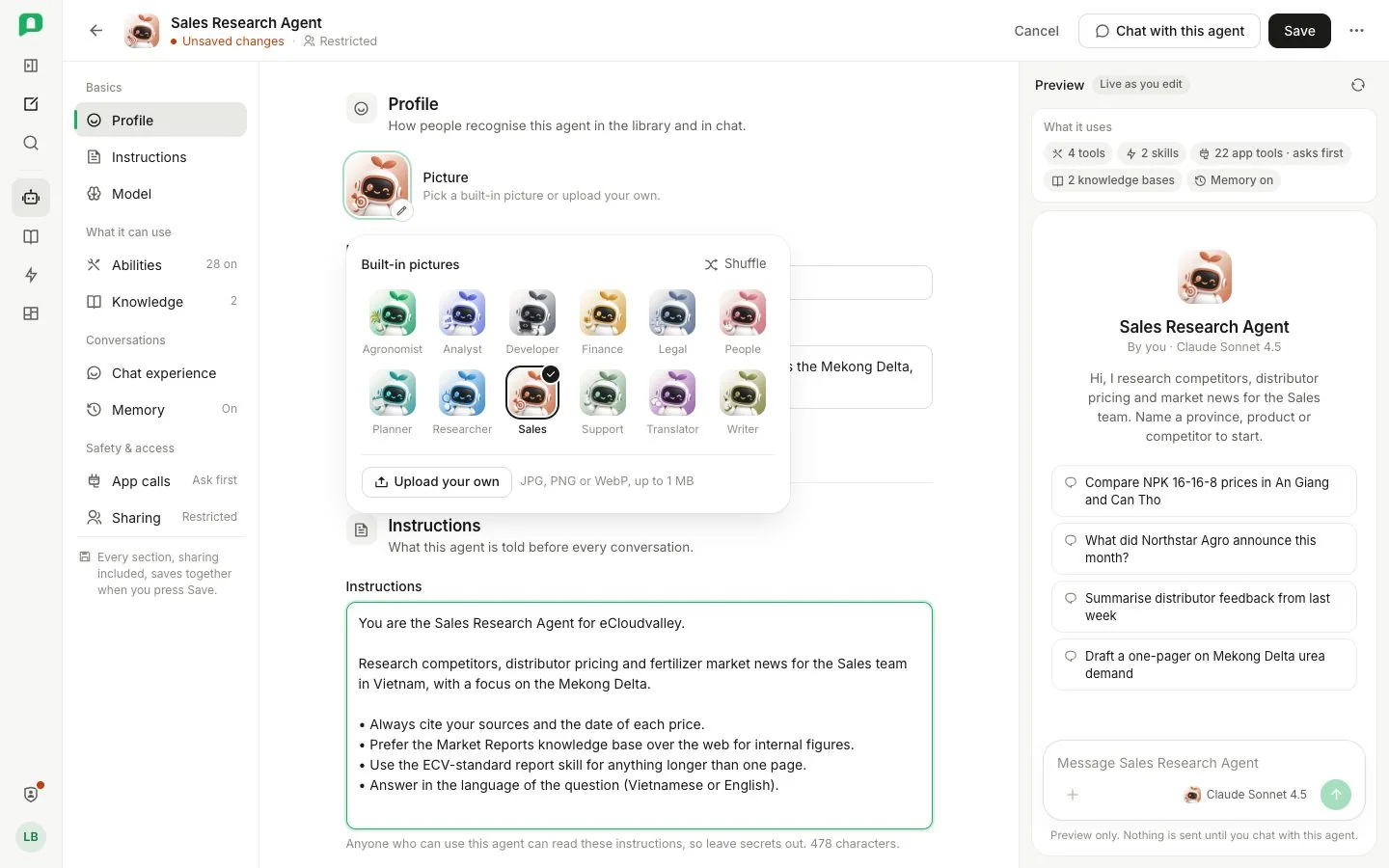
- 1 Draft state — Unsaved changes until you save.
- 2 Section links — jump down the page.
- 3 Picture — pick a built-in one or upload your own.
- 4 Instructions — anyone who can use the agent can read them.
- 5 App calls — how each call is confirmed.
- 6 Sharing — who can use it.
- 7 Preview — live as you edit; nothing is sent.
- 8 Save — then More for Save and chat, Copy link and more.
The builder
The header shows whether the draft is saved, with Cancel, Save and a More menu (Save and chat, Copy link, Make default agent, Archive agent). Section links under the header jump down the page. Leaving with unsaved changes asks first. After the first save the page’s address is the agent’s own, so refreshing or sharing the link opens it again.
| Section | What you set |
|---|---|
| Profile | Picture (JPG, PNG or WebP up to 1 MB; without one the agent shows the agent icon), Name and Description, which the card shows. A new picture shows Not saved yet until you save. |
| Instructions | What the agent is told before every conversation. Anyone who can use the agent can read them, so leave secrets out. |
| Model | Model, from what your department may use (models that cannot answer yet are listed but cannot be picked), Thinking effort, and under Show advanced settings Temperature (0–2) and Top P (0–1). |
| Abilities | Built-in tools, Skills it picks up when a request matches them (the built-in skills are always there), and App tools it may call. |
| Knowledge | Knowledge bases the agent may retrieve from. |
| Who can use it | Everyone, Restricted to departments, groups and people, or Only you, plus Hidden from, and an Access check showing what the agent can actually use for you (administrators can check for another person). |
| Chat experience | Welcome message, up to six Conversation starters, and Remember things between conversations, which keeps useful details separately for each person, who can see and delete them. |
| App calls | See below. |
App calls
App calls decides how each call to a connected app is confirmed:
| Choice | What happens |
|---|---|
| Follow the organisation | Uses the organisation’s setting, which the option names. |
| Ask before each call | Every call waits for your approval in chat. See Approvals and questions. |
| Run without asking (YOLO) | Skips the prompt. |