

Models and thinking effort
Pick the model that writes the answer and how much it thinks first — and why a model may be missing or greyed out.
The agent picker in the message box also holds the model list and the thinking control.
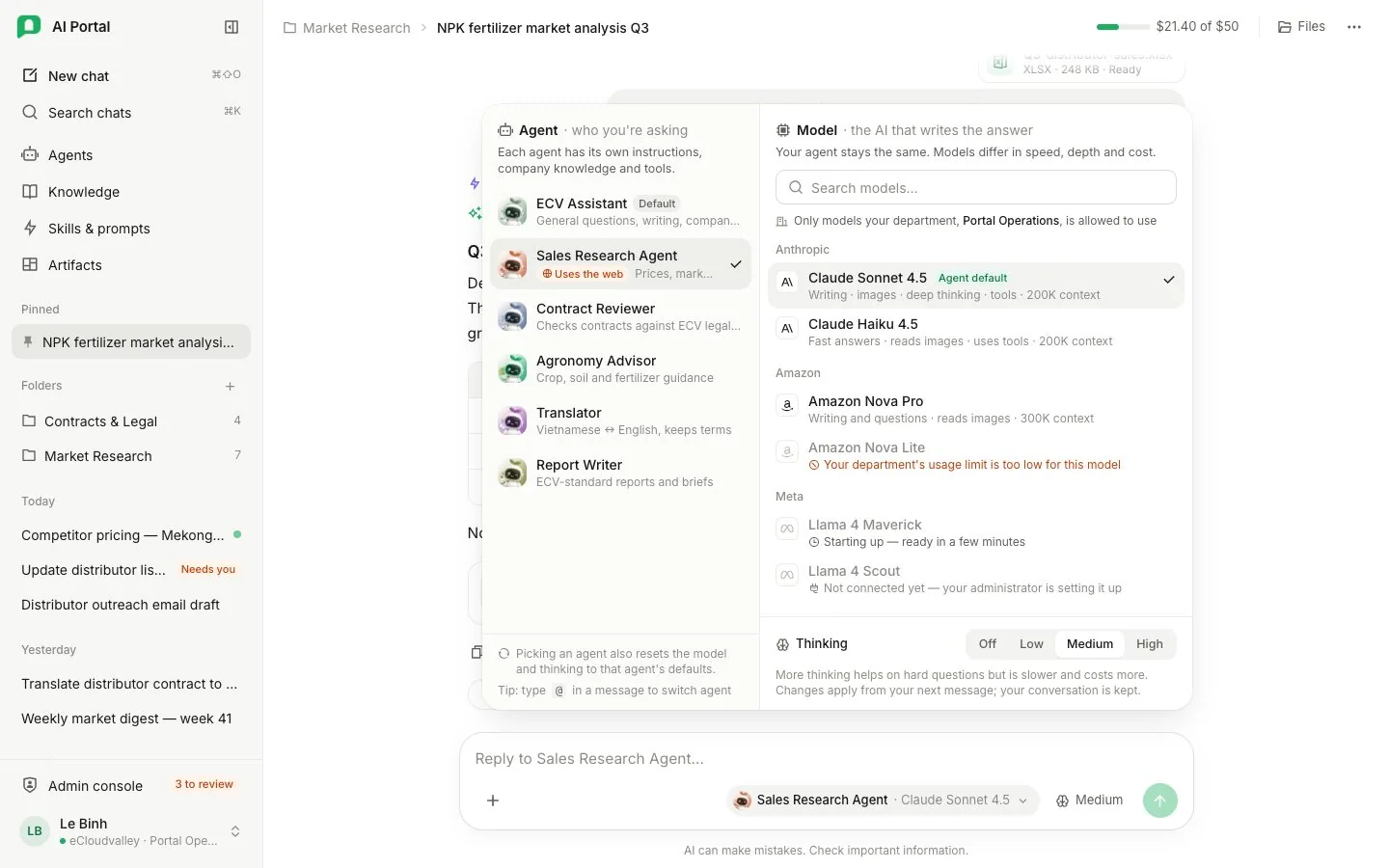
- 1 Agent — who you’re asking.
- 2 Search models — filters the list.
- 3 Only models your department may use are listed.
- 4 Agent default — the agent’s own model, with capabilities and context size.
- 5 Greyed out — the line says why it can’t be picked.
- 6 Starting up — ready in a minute or so.
- 7 Thinking — Off, Low, Medium or High.
- 8 Picking an agent resets the model and thinking to its defaults.
Choosing a model
The list holds every chat model the organisation catalogued, minus what your department switched off, grouped by provider.
- Search models filters the list. The picker marks the agent’s default model with Agent default and shows model descriptions, capabilities and context size. Models with the same name show their configuration IDs to tell them apart.
- The selection holds for the chat, and reopening it restores the model its last message was answered with.
- Selecting another agent resets the model and thinking effort to that agent’s defaults.
- While a reply runs, a change applies to the next message.
A model is missing or greyed out
A missing model was never catalogued, was switched off, or was given up by your department; your administrator knows which.
A model that is listed but greyed out cannot answer yet, and says why. It cannot be picked until then:
| Reason shown | Meaning |
|---|---|
| Not connected yet — your administrator is setting it up | An administrator still needs to connect it. |
| Starting up — ready in a few minutes | It will be ready in a minute or so. |
| Stopped answering | An administrator has been told. |
| Your department’s usage limit is too low for this model | The model’s largest reply is bigger than your department’s per-minute limit. |
Thinking effort
The Thinking control sets the turn’s effort levelThinking effortMức suy nghĩHow long the model may think before answering. More effort can help with hard questions, but it takes longer and costs more.Open in glossary: Off, Low, Medium or High, applied to the whole turn.
- Off disables extended thinking; High allows more reasoning before each response. More thinking helps on hard questions, but is slower and costs more.
- A model that cannot reason leaves the control greyed out at Off.
- The agent proposes a level; you override it per message. If the model can think harder, the level sets the thinking depth of each model call; if not, there is no extended thinking.
- A new chat starts at the level its agent is configured for. Reopening a chat restores its draft’s chosen level, or the level its last message ran at.
- Changes apply from your next message; your conversation is kept.